최근에 노마드코더에서 바닐라 자바스크립트로 To do list를 만드는것을 해보았다.
확실히 프론트엔드라 그런지 무언가를 만들때마다 바로바로 결과가 나타나서 재밌었다.
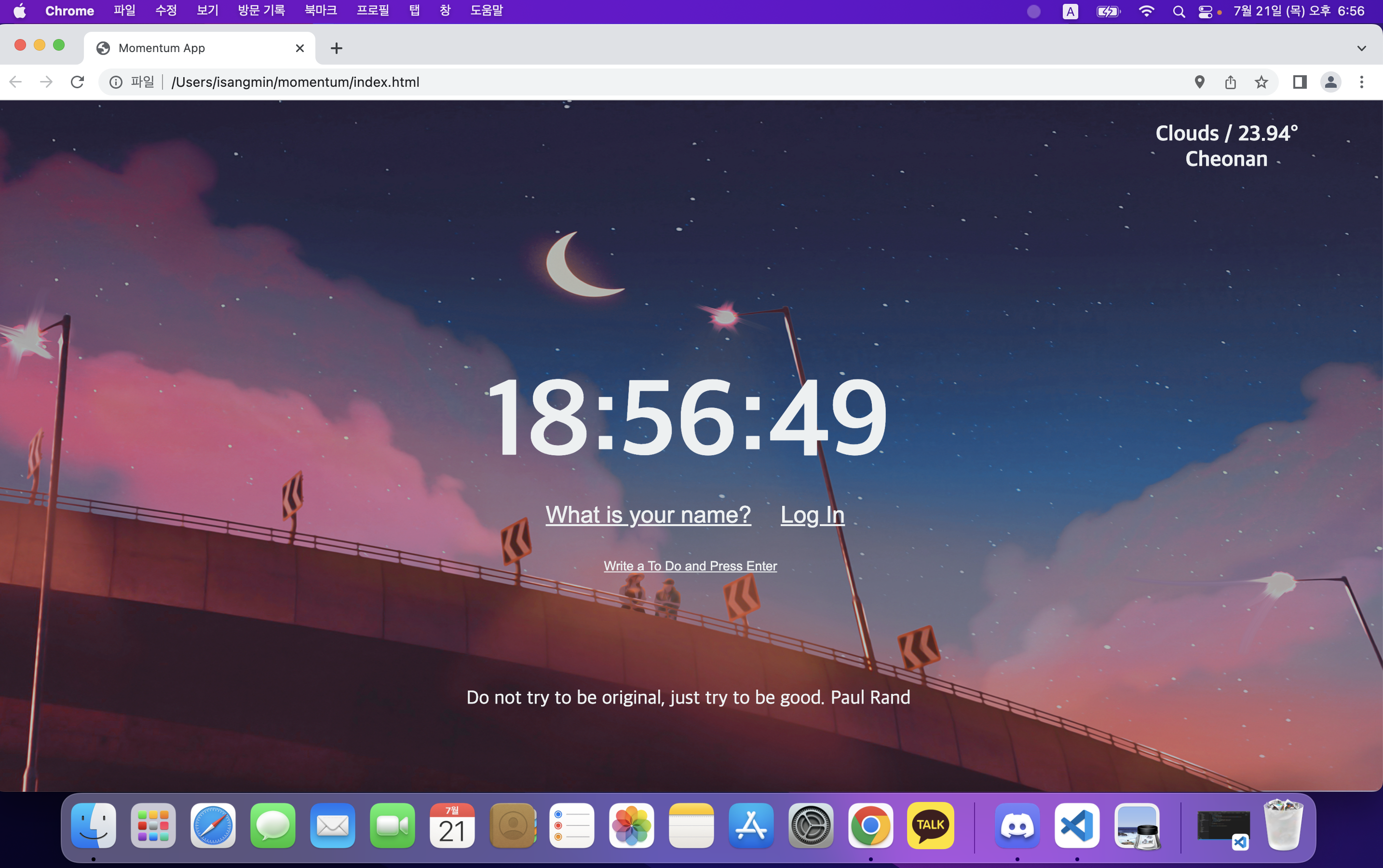
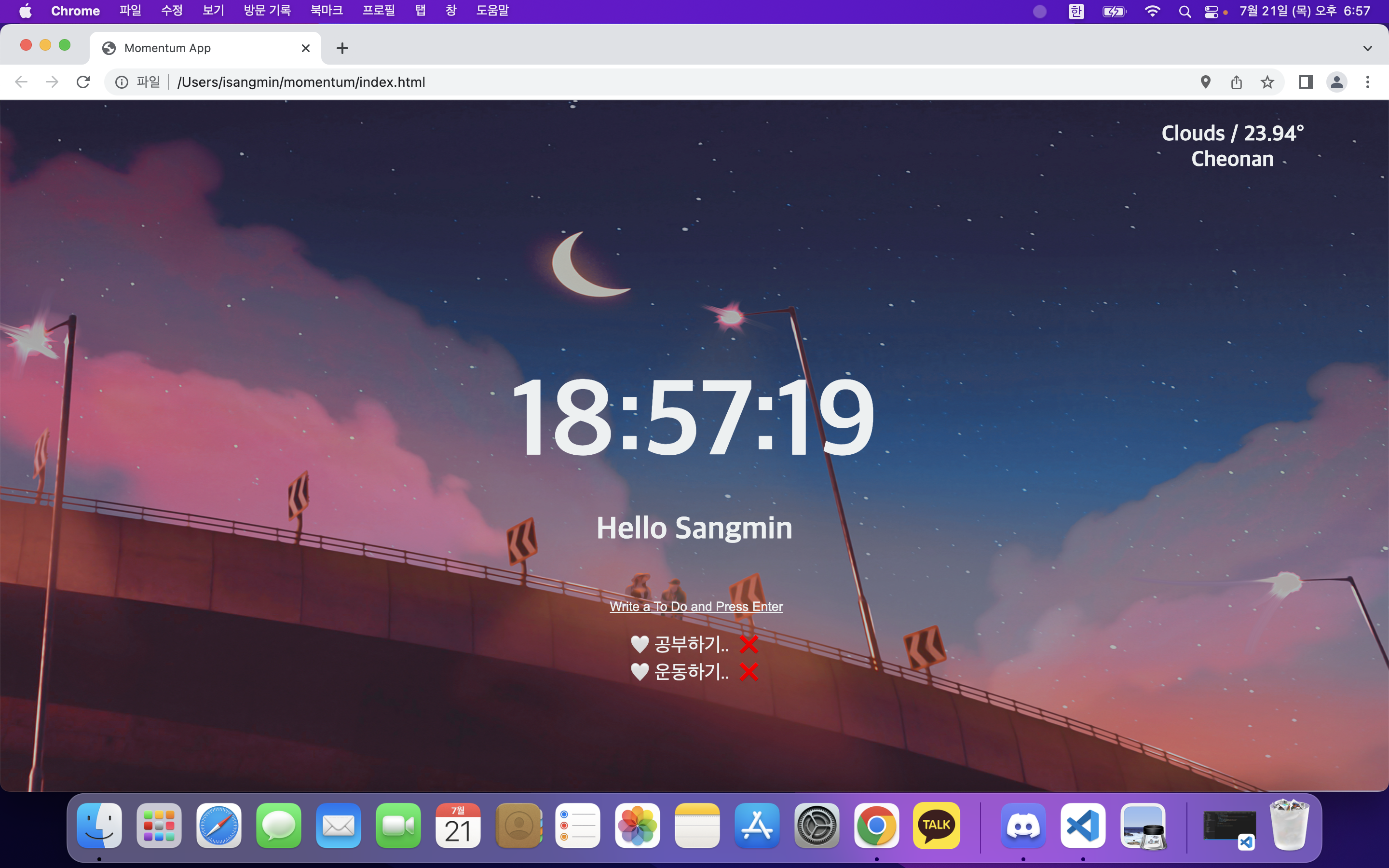
HTML/ CSS / JAVASCRIPT로 나누어서 파일을 각각 만들었다. 밑에는 결과물이다.
index.html
<!DOCTYPE html>
<html lang="ko">
<head>
    <meta charset="UTF-8">
    <meta http-equiv="X-UA-Compatible" content="IE=edge">
    <meta name="viewport" content="width=device-width, initial-scale=1.0">
    <link rel="stylesheet" href="css/style.css"/>
    <title>Momentum App</title>
</head>
<body>
    <div id="weather">
        <span class="weather"></span>
        <span class="city"></span>
    </div>
    <h2 id="clock">00:00:00</h2>
    <form class="hidden" id="login-form">
        <input
        required
        maxlength="15"
        type="text"
        placeholder="What is your name?"/>
        <input type ="submit" value ="Log In"/>
    </form>
    <h1 class="hidden" id="greeting"></h1>
    <form id="todo-form">
        <input type="text" placeholder="Write a To Do and Press Enter" required/>
    </form>
    <ul id="todo-list"></ul>
    <div id="quote">
        <span></span>
        <span></span>
    </div>

    <script src="js/greetings.js"></script>
    <script src="js/clock.js"></script>
    <script src="js/quotes.js"></script>
    <script src="js/background.js"></script>
    <script src="js/todo.js"></script>
    <script src="js/weather.js"></script>
</body>
</html>
style.css
.hidden {
    display: none;
}

body{
    background-color: #2d3436;
    text-align: center;
    color: #ecf0f1;
    padding: 1%;
}

.bgImg{
    position: absolute;
    top:0;
    left: 0;
    width:100%;
    height: 100%;
    z-index: -1;
}
#login-form > input{
    border: none;
    background: transparent;
    color : #ecf0f1;
    font-size: 24px;
    text-align: center;
    text-decoration: underline;
}
#login-form > input:focus{
    outline: none;
}
#login-form > input::placeholder{
    color:#ecf0f1;
}

#clock{
    text-align: center;
    font-size: 7em;
    margin-top : 14%;
    margin-bottom: 10px;
    font-family: "궁서";
}

#greeting{
    font-family: "궁서";
}

#todo-form > input{
    border: none;
    background: transparent;
    color:#ecf0f1;
    width: 100%;
    text-align: center;
    text-decoration: underline;
    margin-top : 30px;
}

#todo-form > input:focus{
    outline:none;
}

#todo-form > input::placeholder{
    color:#ecf0f1;
}

ul{
    margin-left : 42%;
}

li{
    list-style: none;
    font-size: 20px;
    text-align:left;
    color: #ecf0f1;
}
li:before{
    content:"🤍";
    display: inline;
    padding: 5px;
}

button{
    border: none;
    background: transparent;
    padding-left : 10px;
    font-size: 20px;
}
#quote {
    padding-top : 100px;
    font-size: 20px;
    font-family: "궁서";
}
.weather{
    font-weight: bold;
    font-size: 22px;
    padding-left: 80%;
    font-family: "궁서";
}

.city{
    font-weight: bold;
    font-size: 22px;
    padding-left: 80%;
    font-family: "궁서";
}
greeting.js
const loginForm = document.querySelector("#login-form");
const loginInput = document.querySelector("#login-form input");
const greeting = document.querySelector("#greeting");

const HIDDEN_CLASSNAME = "hidden";
const USERNAME_KEY = "username";

function OnLoginSubmit(event){
    event.preventDefault();
    loginForm.classList.add(HIDDEN_CLASSNAME);
    const username = loginInput.value;
    localStorage.setItem(USERNAME_KEY,username);
    paintGreetings(username);
}

function paintGreetings(username){
    greeting.innerText = "Hello " + username; //`Hello ${username}`;과 같음
    greeting.classList.remove(HIDDEN_CLASSNAME);
}
const savedusername = localStorage.getItem(USERNAME_KEY);

if(savedusername===null)
{
    loginForm.classList.remove(HIDDEN_CLASSNAME);
    loginForm.addEventListener("submit", OnLoginSubmit);
    //show the form
}
else{
    paintGreetings(savedusername);
    //show the greetings
}
clock.js
const clock = document.querySelector("h2#clock");

function getClock(){
    const date = new Date();
    const hours = String(date.getHours()).padStart(2,"0");
    const minutes = String(date.getMinutes()).padStart(2,"0");
    const seconds = String(date.getSeconds()).padStart(2,"0");
    clock.innerText = `${hours}:${minutes}:${seconds}`;

}

getClock();
setInterval(getClock,1000);
quotes.js
const quotes = [
    {
        quote : "I never dreamed about success, I worked for it.",
        author : "Estee Lauder",
    },
    {
        quote : "Do not try to be original, just try to be good.",
        author : "Paul Rand",
    },
    {
        quote : "Do not be afraid to give up the good to go for the great.",
        author : "John D. Rockefeller",
    },
    {
        quote : "If you cannot fly then run. If you cannot run, then walk. And, if you cannot walk, then crawl, but whatever you do, you have to keep moving forward.",
        author : "Martin Luther King Jr.",
    },
    {
        quote : "Our greatest weakness lies iies giving up. The most certain way to succeed is always to try just one more time.",
        author : "Thomas Edison",
    },
    {
        quote : "The fastest way to change yourself is to hang out with people who are already the way you want to be.",
        author : "Reid Hoffman",
    },
    {
        quote : "Money is like gasoline during a road trip. You do not want to run out of gas on your trip, but you 're not doing a tour of gas stations.",
        author : "Tim O'Reilly",
    },
    {
        quote : "Some people dream of success, while other people get up every morning and make it happen.",
        author : "Wayne Huizenga",
    },
    {
        quote : "The only thing worse than starting something and failing ...is not starting something.",
        author : "Seth Godin",
    },
    {
        quote : "If you really want to do something, you'll find a way. If you do not, you'll find an excuse.",
        author : "Jim Rohn",
    }
];
const quote = document.querySelector("#quote span:first-child");
const author = document.querySelector("#quote span:last-child");

const todaysQuote = quotes[Math.floor(Math.random()*quotes.length)];

quote.innerText = todaysQuote.quote;
author.innerText = todaysQuote.author;
todo.js
const toDoForm = document.getElementById("todo-form");
const toDoInput = document.querySelector("#todo-form input");
const toDoList = document.getElementById("todo-list");

const TODOS_KEY = "todos";
let toDos = [];

function saveToDos(){
    localStorage.setItem(TODOS_KEY, JSON.stringify(toDos));
}
function deleteTodo(event){
    const li = event.target.parentElement;
    li.remove();
    toDos = toDos.filter((toDo) => toDo.id !== parseInt(li.id));
    saveToDos();
}

function paintToDo(newTodo){
    const li = document.createElement("li");
    li.id = newTodo.id;
    const span = document.createElement("span");
    span.innerText = newTodo.text;
    const button = document.createElement("button");
    button.innerText = "❌";
    button.addEventListener("click",deleteTodo);
    li.appendChild(span);
    li.appendChild(button);
    toDoList.appendChild(li);
}

function handleToDoSubmit(event){
    event.preventDefault();
    const newToDo = toDoInput.value;
    toDoInput.value="";
    const newTodoObj = {
        text: newToDo,
        id : Date.now(),
    };
    toDos.push(newTodoObj);
    paintToDo(newTodoObj);
    saveToDos();
}

toDoForm.addEventListener("submit",handleToDoSubmit);

const savedToDos = localStorage.getItem(TODOS_KEY);

if(savedToDos !== null){
    const parsedToDos = JSON.parse(savedToDos);
    toDos = parsedToDos;
    parsedToDos.forEach(paintToDo); //이부분 중요 이해해야함
}
background.js
const body = document.querySelector("body");

// 이미지 갯수
const IMG_NUMBER=3;

// 랜덤 숫자 생성
function GetRandom(){
    return Math.floor(Math.random()* IMG_NUMBER);
}

// 랜덤 이미지 출력
function paintImage(imgNumber) {
    const img = new Image();
    img.src = `img/${imgNumber}.jpeg`;
    img.classList.add("bgImg");
    body.prepend(img);
}

// 랜덤 수 생성해서, 랜덤 이미지 출력하기
function init() {
    const randomNumber = GetRandom();
    paintImage(randomNumber);
}

init();
weather.js
const API_KEY = "본인API";
function onGeoOk(position){
    const lat = position.coords.latitude;
    const lon = position.coords.longitude;
    const url = `https://api.openweathermap.org/data/2.5/weather?lat=${lat}&lon=${lon}&appid=${API_KEY}&units=metric`
    fetch(url)
    .then((response) => response.json())
    .then((data) =>{
        const weather = document.querySelector("#weather span:first-child");
        weather.innerText = `${data.weather[0].main} / ${data.main.temp}°`;
        const city = document.querySelector("#weather span:last-child");
        city.innerText = data.name;
     });
}
function onGeoError(){
    alert("Can't find you. No weather for you.");
}

navigator.geolocation.getCurrentPosition(onGeoOk,onGeoError);
결과화면 캡쳐
깃허브 링크
https://github.com/netco97/clone-coding/tree/main/vanilla%20javascript
'FE > JavaScript' 카테고리의 다른 글
| [JavaScript] call back, promise, async await (1) | 2022.08.05 |
|---|---|
| [JavaScript] 브라우저 동작원리, JSON (0) | 2022.08.04 |
| [JavaScript] addEventListener 및 event 처리 (0) | 2022.07.19 |


댓글